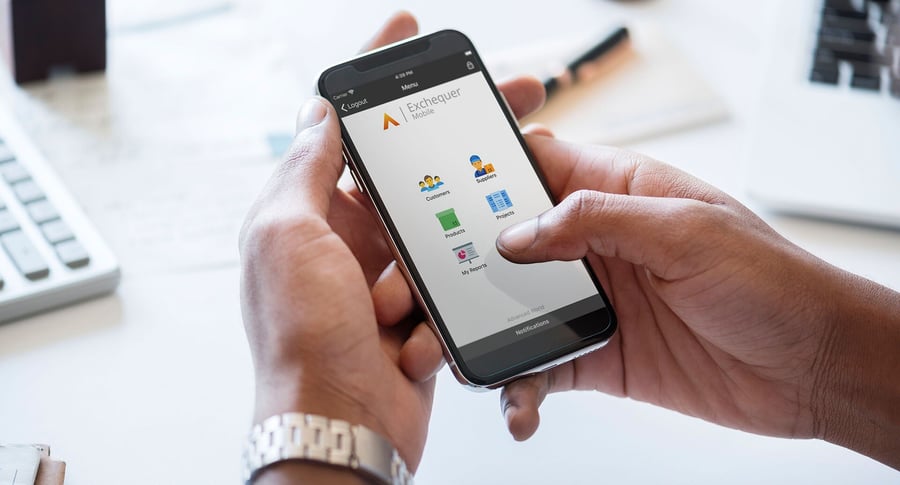
If you already use Advanced Exchequer, you may also have access to functionality that makes it easier for people outside the finance team to view information and complete selected tasks without needing to sit at their usual workstation.
That is where Exchequer Mobile can be useful.
Rather than giving every user full access to the desktop system, Exchequer Mobile provides selected self-service functions through supported mobile devices.
For finance teams, that can mean fewer interruptions, quicker approvals and easier access to information for colleagues who only need specific parts of the system.
Here are some of the areas worth knowing about.
1. Approve transactions without being in the office
One of the most practical uses of Exchequer Mobile is its notification and approval functionality.
Users can receive notifications from the back-office team or other Exchequer Mobile users and review transactions that require their attention.
For example, where an invoice needs approval, the user can view the transaction along with any associated information or attachments that have been made available.
They can then take the appropriate action, such as approving, rejecting or delegating the transaction.
This can be particularly useful for organisations where approvers are frequently away from their desk.
Instead of an invoice sitting in a queue until somebody returns to the office, the approval process can continue while they are working remotely or travelling.
The benefit for finance is straightforward:
less chasing, fewer bottlenecks and a clearer approval trail.
2. Give users access to the reports they actually need
Reporting is another area where Exchequer Mobile can reduce dependency on the finance team.
The current Exchequer Mobile app still supports the ability to provide users with their own tailored list of management reports through the My Reports area. These can include sales reports, Excel management packs and other documents made available to the user.
The important part is control.
Finance teams can determine which reports are published and which users are allowed to see them.
That means managers do not necessarily need to ask finance every time they want access to a familiar report.
Instead, relevant information can be made available directly to them.
For example, a sales manager might need a regular sales report.
A director might want management information.
Another user may only need a small number of operational reports.
Giving people access to the information relevant to their role can reduce the number of routine requests landing with finance.
3. Access customer and supplier information on the move
Exchequer Mobile can also provide access to customer and supplier information.
This can be useful for people who need financial information but do not spend their working day inside Exchequer.
Users can access sales and purchase ledger account information, including relevant transactional detail.
The original functionality also includes useful shortcuts such as links to telephone numbers and email addresses and mapping from postcode information, helping users move quickly from the financial record to the action they need to take.
For example, someone visiting a customer could potentially check account information before a meeting rather than having to contact finance for an update.
4. Drill into the information behind a transaction
High-level information is useful, but sometimes users need more detail.
Exchequer Mobile can provide access to transaction-level information for customer and supplier accounts.
Where documents and attachments are linked to transactions in Exchequer, users can also access supporting information.
That complements functionality already available in the desktop system, where Exchequer allows files such as scanned invoices and other documents to be linked to records for easier retrieval.
This can make Exchequer Mobile more useful than simply displaying headline balances.
It gives authorised users a way to investigate the information behind those figures.
5. Reduce routine queries coming into finance
This is probably the biggest reason existing Exchequer customers should consider the mobile functionality.
Finance teams often become the unofficial information desk for the rest of the business.
Questions such as:
“Has this invoice been approved?”
“Can you send me the latest sales report?”
“What does this customer owe us?”
“Can you resend that document?”
may each take only a few minutes to answer.
But repeated across a week, they consume a considerable amount of time.
Giving appropriate users controlled access to information can shift some of those routine queries into self-service.
That does not remove control from finance.
It simply means finance does not have to act as the middleman every time somebody needs information.
Is Exchequer Mobile still supported?
Yes.
Exchequer itself moved into extended support, meaning Advanced reduced investment in major new product development and shifted its roadmap towards essential maintenance, legislative changes and security work. HBP continues to support Exchequer customers as normal.
Exchequer Mobile also remains available. The Android app was updated in August 2026 for compatibility with Android 16, showing that the mobile application is still being maintained for current device support.
That said, because Exchequer is now in extended support, we would treat Exchequer Mobile as a way to get more from an existing Exchequer environment, rather than presenting it as a major new strategic investment in the platform.
Who could benefit most from Exchequer Mobile?
It may be worth reviewing if you have:
- directors who regularly ask finance for management reports;
- managers who need to approve transactions while away from the office;
- sales teams who need access to customer account information;
- operational users who only need limited financial information;
- finance teams spending time answering repeated information requests;
- users who do not need full desktop access to Exchequer.
The key is not to give everybody access to everything.
It is to give the right people access to the information and tasks they actually need.
Could you be getting more from your existing Exchequer setup?
For long-standing Exchequer customers, it is easy to focus only on the parts of the system that are already used every day.
But there may still be functionality around your existing setup that could remove unnecessary administration.
Exchequer Mobile is one example.
If approvals, reports or customer information are still regularly being passed around manually, it may be worth reviewing whether some of that activity could be handled more efficiently.
At The HBP Group, we can help you understand what functionality is available within your current Exchequer environment and whether Exchequer Mobile could be useful for your team.
Speak to The HBP Group about getting more from Advanced Exchequer.



.png?width=100&name=HBP%20Gradient%20Bar%20(210mm).png)

 info@thehbpgroup.co.uk
 01482 423910


.png?width=2484&height=10&name=HBP%20Gradient%20Bar%20(210mm).png)