Sage Intacct R1 2026 introduces a mix of AI-driven automation, usability improvements, and structural enhancements across core finance workflows.
The key theme in this release is reduction of manual effort at scale, particularly in Accounts Payable, data imports, and reconciliation processes.
Below are the updates that can affect how your finance team operates day-to-day.
AI-Powered Automation
AP Automation Email Platform Update
Between February 13 and 16, all organisations are migrated to a new AP Automation email domain and processing platform.
What’s changed:
- Support for additional file formats when submitting invoices
- Ability to configure automated email forwarding rules
- Enhanced notifications that alert users when documents fail to process
Operational impact: This improves reliability and visibility in invoice ingestion. Failed documents are no longer a hidden issue, reducing delays that typically surface during reconciliation.
Predictive Tax Coding in AP Automation
AP Automation can now automatically predict tax details during invoice processing.
What this includes:
- Applies to both single-line summarised transactions and fully itemised invoices
- Supports tax calculation at both summary and line level
- Reduces the need for manual tax code assignment
Operational impact: This removes one of the most manual and error-prone steps in AP, improving consistency without sacrificing control.
Company and Administration
AI-Powered Import Agent
The import service now includes AI-driven tools within the import workspace, allowing data to be transformed directly in the system alongside enhanced field mapping capabilities that streamline and improve the accuracy of the import process.
What’s changed:
- Data can be transformed directly within the import service
- Intelligent field mapping improves accuracy during import
- Reduced reliance on pre-formatting data outside the system
Operational impact: Speeds up implementation and ongoing data management, particularly for organisations importing from multiple external systems.
New client user type-Consoles
A new Client user type has been introduced - designed for Accounting console environments:
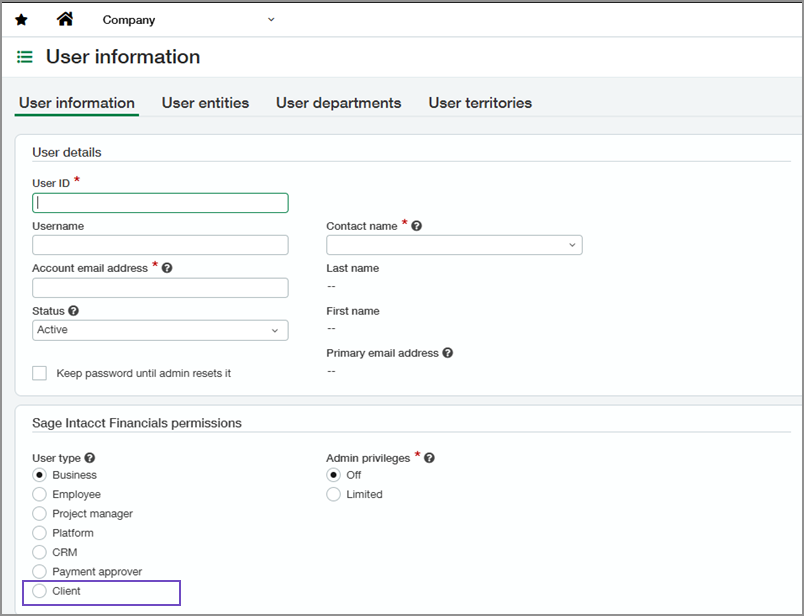
Key behaviour:
- Provides broader access than the Payment Approver role
- Enables users to perform additional operational tasks beyond approvals
Operational impact: Improves role alignment and reduces the need for permission workarounds across finance teams.
Accounts Payable
Enhanced Pay Bills
The Pay Bills function has been updated with improved filtering and usability enhancements, released through a phased general availability rollout.
What’s changed:
- More flexible filtering options for selecting bills
- Improved usability when processing large volumes of transactions
Operational impact: Supports faster and more accurate payment processing in high-volume AP environments without changing financial controls.
Notifications for Recurring Transactions
Email notifications are now triggered when recurring AP or AR transactions fail to generate.
What this means:
- Alerts are sent immediately when scheduled transactions do not run
- Applies across both Accounts Payable and Accounts Receivable
Operational impact: Prevents silent failures and ensures recurring transactions remain consistent, reducing issues later in the reporting cycle.
Post AP Advances at Top Level
AP advances can now be created and posted at the company (top) level.
What’s changed:
- Removes the need to process advances at individual entity level
- Centralises advance handling across entities
Operational impact: Simplifies workflows for multi-entity organisations and reduces administrative overhead.
Accounts Receivable
Customer Health Insights
Customer Health Insights adds three fields to the customer record, creating a consistent structure for capturing health data from CRM systems, internal processes, or external sources.
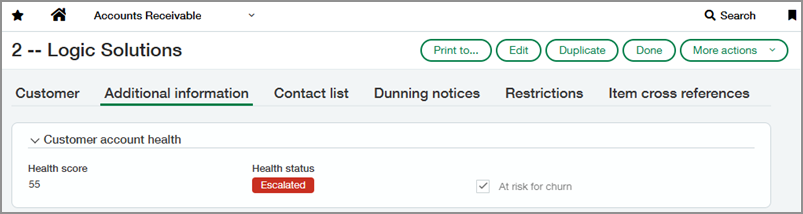
What this enables:
- Storage of health metrics from CRM, internal processes, or external systems
- Standardised view of customer risk across finance
Operational impact: Allows finance teams to identify risk earlier and take action on renewals, collections, or credit decisions.
Cash Management
Improved Check Printing Setup
Check printing configuration has been simplified with a more intuitive setup experience.
What’s changed:
- Enhanced control over formatting, including addresses and logos
- Removal of unnecessary fields to streamline setup
Operational impact: Reduces setup time and improves consistency in check output across entities.
Document Number in Bank Interest and Charges
A Document number field is now included on the Bank Interest and Charges page and carried through to all related pages and reports:
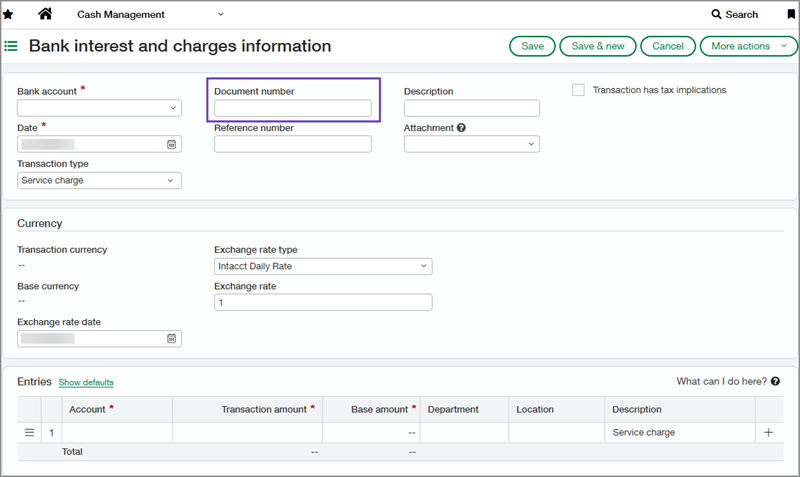
What this means:
- Each charge or interest entry can now be uniquely identified
- Document numbers are visible throughout reconciliation and reporting
Operational impact: Improves traceability and auditability during bank reconciliation.
Bank Transaction Visibility
Transactions imported through the Bank Transaction Assistant now appear in the Banking cloud tab alongside bank feed data.
What’s changed:
- Imported and bank-fed transactions are now managed in the same interface
- Removes separation between transaction sources
Operational impact: Creates a single workflow for managing bank transactions, reducing fragmentation and reconciliation errors.
Entity Location in Bank Register
Entity location in Bank Register report: When the report is run at the entity level, it now automatically includes the entity’s location, ensuring reports reflect the correct context and reducing errors caused by missing or inconsistent location data.
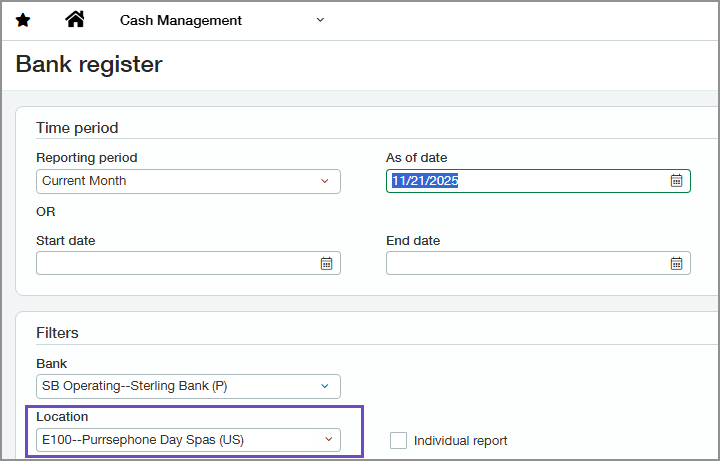
What this means:
- Location data is applied without manual input
- Reports reflect the correct entity context by default
Operational impact: Reduces reporting errors caused by missing or inconsistent location data.
Contracts
Automated Renewal Pricing Updates
New CSV import and API capabilities allow bulk updates to contract pricing, enabling more efficient workflows and ensuring renewal pricing stays aligned with CPI or other defined adjustments.
What’s changed:
- Supports automated pricing updates across large contract volumes
- Enables alignment with CPI or other pricing models
Operational impact: Removes manual updates and reduces risk of pricing inconsistencies.
Revert Dimension Reassignment
Users can now restore original dimensions in a single step, allowing errors to be corrected without editing the General Ledger or performing additional reassignments:
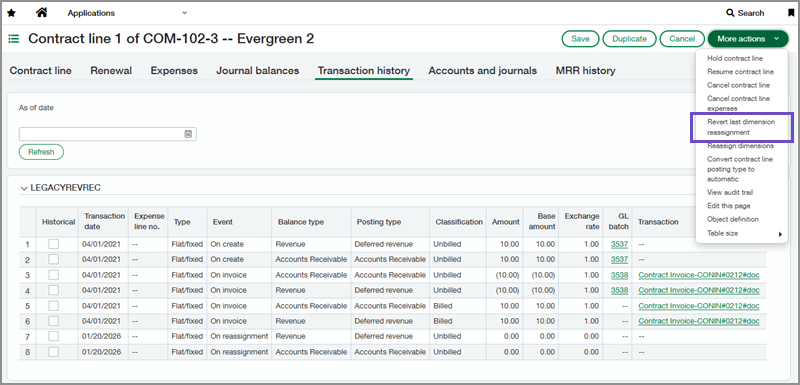
What’s changed:
- Eliminates the need for manual corrections in the General Ledger
- Removes requirement for multiple adjustment entries
Operational impact: Simplifies error correction and improves data integrity.
Fixed Assets Management
Update Asset Cost via AP Adjustments
Asset costs can now be adjusted directly through Accounts Payable adjustments, allowing corrections for capital improvements, revaluations, or acquisition inaccuracies without requiring separate asset workflows.
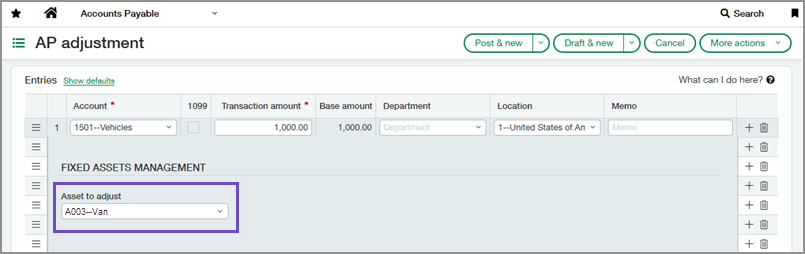
What this supports:
- Capital improvements
- Asset revaluations
- Correction of acquisition errors
Operational impact: Removes the need for separate asset adjustment processes and streamlines corrections.
Roll Forward Report
A new report provides visibility into asset lifecycle movements across reporting periods, including additions, disposals, and adjustments, helping teams reconcile the fixed assets subledger with the general ledger more accurately:
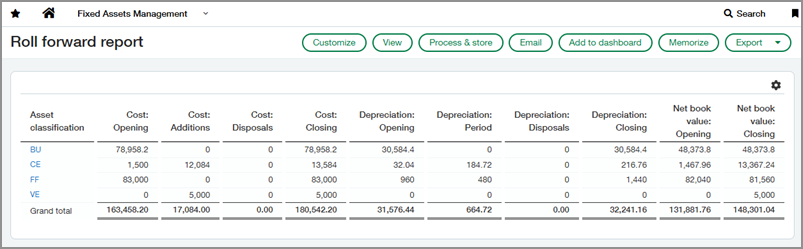
What this includes:
- Tracking of additions, disposals, and adjustments
- Period-over-period asset movement visibility
Operational impact: Improves reconciliation between the fixed assets subledger and the general ledger.
Flexible Asset GL Account Assignment
Restrictions on Asset GL accounts have been removed, with a new field added to bill and purchasing transaction lines.
What’s changed:
- Greater flexibility in assigning GL accounts to asset transactions
- Alignment with more complex accounting requirements
Operational impact: Improves flexibility and reduces workarounds in asset accounting.
General Ledger
GL Account Reconciliations
A new reconciliation feature streamlines the matching of offsetting debit and credit entries within the General Ledger, improving efficiency and reducing the manual effort required during review.
What’s changed:
- Centralised reconciliation workflow
- Faster identification of matching transactions
Operational impact: Reduces manual reconciliation effort and improves audit readiness.
Enhanced Dynamic Allocations
Source account groups can now also be used as allocation targets.
What this enables:
- Distribution of balances across dimensions
- Preservation of original account balances within a single allocation definition
Operational impact: Increases flexibility in allocation modelling without adding complexity.
Inventory and Supplies
Flexible Selection and Reservation of Supplies
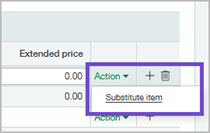
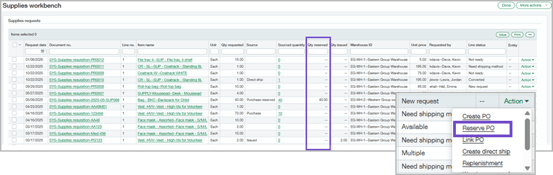
When requested items are unavailable, you can now define substitutions for priority items, while also reserving stock directly from purchase orders so requests are prioritised for fulfilment;
What’s changed:
- Ability to substitute items when stock is unavailable
- Automatic reservation of items from purchase orders
Operational impact: Improves fulfilment reliability and ensures priority requests are met.
Order Entry
Customer Billing Groups
Customers can now be grouped for billing purposes.
What this enables:
- Application of shared charges across multiple customers
- Generation of consolidated invoices from a single location
Operational impact: Simplifies billing processes and reduces manual invoice creation.
Purchasing
Line-Level Matching in AP Automation (General Availability)
Line-level document matching is now generally available across AP Automation and Purchasing.
What’s changed:
- Matching occurs at individual line level rather than document total
- Improved alignment between purchase orders and invoices
Operational impact: Increases matching accuracy and reduces manual intervention in exception handling.
Tax
Streamlined Tax Totals in Converted Transactions
When Order Entry and Purchasing transactions with VAT or GST are converted into AP or AR, net and tax amounts now appear on a single line.
What’s changed:
- Combined display of net and tax values
- Reflected consistently in custom tax reporting
Operational impact: Improves clarity and reduces confusion in both transaction views and reports.
Tax Box Reporting (General Availability)
Tax liabilities can now be calculated directly within Sage Intacct.
What this enables:
- Calculation of VAT or GST for a defined period
- Use of standard or custom tax configurations
- No requirement to close books before running reports
Operational impact: Removes reliance on external calculations and provides real-time visibility of tax obligations.
Avalara AvaTax Enhancements
New fields have been introduced for exemption use codes and reporting locations.
What’s changed:
- Improved handling of tax exemptions
- More accurate reporting across locations
Operational impact: Strengthens control and accuracy in Avalara AvaTax integrations.
Time and Expense
Geofencing for Time Tracking
The Sage Intelligent Time mobile app can now verify employee location during clock-in and clock-out.
What this includes:
- Location tracking based on defined boundaries
- Visibility into whether employees are within approved areas
Operational impact: Supports compliance and improves accuracy for field-based teams.
Centralised Time Settings
Time configuration options are now available within Time Preferences as well as the Configure Time page.
What’s changed:
- Consolidation of all Sage Intelligent Time settings
- Easier access to configuration controls
Operational impact: Reduces setup complexity and improves usability.
User Interface
UI Improvements
Updates have been made to labels and terminology across the system.
What’s changed:
- Improved clarity and consistency in naming
- Reduced ambiguity in navigation
Help Centre Behaviour
The Help Centre now opens in a new browser tab positioned alongside Sage Intacct.
Operational impact: Allows users to access help content without disrupting their workflow inside the system.
Practical Impact
Across the release, three patterns stand out:
- Automation replacing manual input
Tax coding, imports, and document matching are increasingly handled within the system. - Better exception handling
Notifications and validation improvements reduce silent failures. - Scalability without added overhead
Enhancements across AP, GL, and allocations support higher transaction volumes without increasing workload.
What to Focus On
Do not try to review everything. Focus where friction already exists.
Priority areas:
- AP Automation, particularly tax prediction and line-level matching
- Import processes and data mapping
- GL reconciliation workflows
If these are not pressure points, either your processes are already optimised or you are not yet operating at scale.
If you would like help understanding which of these changes are most relevant to your environment or how they can be applied in practice, get in touch with our expert team who are available to support you.


.png?width=100&name=HBP%20Gradient%20Bar%20(210mm).png)

 info@thehbpgroup.co.uk
 01482 423910


.png?width=2484&height=10&name=HBP%20Gradient%20Bar%20(210mm).png)