Sage Intacct 2025 Release 3 includes several workflow and control improvements that affect how finance teams process payments, manage approvals, apply cash, protect posting accuracy, and control General Ledger volume. The updates below focus on specific, practical changes that alter how day to day finance activity is carried out in the system.
These are selected highlights, not every change in the release. If you want to review the full list of R3 updates, you can see them here.
Pay Bills Directly From The Vendors List
Sage Intacct now allows Accounts Payable users to initiate bill payments directly from the Vendors list, rather than navigating first to the Pay bills workspace.
From the Vendors list, users can select a vendor and choose the Pay action. This opens the Pay bills page pre filtered to that specific vendor, displaying their open bills that are eligible for payment.
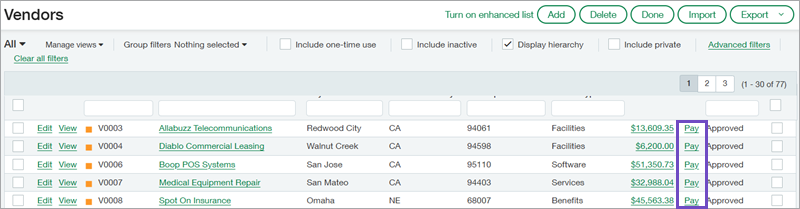
This change is particularly relevant for AP teams that manage workloads on a supplier by supplier basis, rather than working from a consolidated bill queue.
Key behaviour and detail:
-
The Pay option is available for all vendors, regardless of vendor status or outstanding balance
-
The Pay bills window displays open bills that match the default bank account currency, or the base currency if no default bank account is configured in Accounts Payable
-
All standard Pay bills validations still apply, including approval status, payment method constraints, and posting controls
-
Payments created through this route follow the same audit trail and posting logic as payments initiated from the Pay bills workspace
Operationally, this reduces navigation friction but does not change how payments are validated, approved, or posted. It is a workflow efficiency improvement rather than a functional change to AP controls.
Read more: "Pay bills from the Vendors list" >
Delegate Bill Approvals When Approvers Are Out Of Office
Sage Intacct 2025 R3 introduces approval delegation for Accounts Payable bill approvals. This allows approval workflows to continue when an approver is unavailable due to leave or absence.
Delegation is configured in two parts.
First, an administrator enables approval delegation within Configure Accounts Payable and defines which users or user groups are eligible to act as delegates.
Second, individual approvers activate delegation within their own user preferences and specify an out of office period.
Once delegation is active:
-
New bill approvals are routed to the designated delegate during the defined period
-
Approval responsibility automatically reverts to the original approver once the period ends
-
The approver does not need to manually reassign approvals at the end of the period
Key operational details:
-
Delegation activity is recorded, providing audit visibility into who approved transactions and when
-
Delegation can be assigned to individual users or user groups, supporting flexible coverage models
-
Delegation can be configured through the user interface and through the API
This update does not change approval thresholds or approval logic. It ensures continuity of existing approval processes when people are unavailable, reducing stalled approvals without weakening governance.
Read more: "Delegate bill approvals when an approver is out of office" >
Apply Payments Directly From The Customers List
Accounts Receivable users can now receive and apply payments directly from the Customers list.
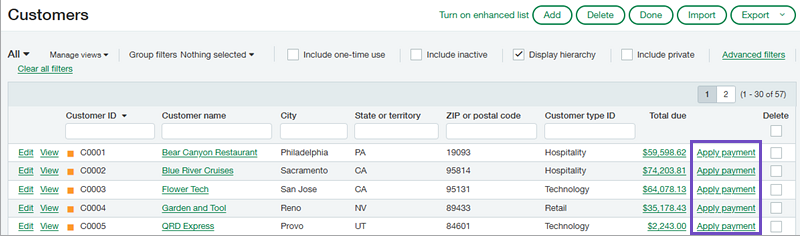
From the Customers list, selecting Apply payment opens the Receive payments page, filtered to the selected customer and displaying their open invoices.
This change mirrors the AP vendor workflow improvement and supports AR teams that work customer by customer, particularly during cash application or credit control reviews.
Key behaviour:
-
The Apply payment option is available at both top level and entity level
-
It appears for all customers, regardless of state or balance
-
The Receive payments page behaves exactly as it does when accessed from the standard AR workflow
What this enables operationally:
-
Faster access to payment entry when reviewing a specific customer
-
Reduced navigation between AR screens
-
No change to posting logic, validations, or audit behaviour
All payments processed through this route are recorded within the Posted payments audit trail, and all existing controls around currencies, payment methods, and posting periods continue to apply.
This is a workflow access improvement rather than a change to AR accounting behaviour.
Read more: "Apply payments from the Customers list" >
Deactivate Alternative AP And AR Accounts
Sage Intacct now allows alternative AP and AR General Ledger accounts to be deactivated, even if they have been used previously or are associated with vendors or customers.
This update addresses a common risk where unused or legacy accounts remain selectable, increasing the chance of accidental postings.
Key behaviour:
-
Deactivated alternative AP and AR accounts no longer appear on Bill, AP Adjustment, or Invoice entry pages
-
Users cannot post new transactions against deactivated accounts
-
The account remains in the system for historical reporting and audit purposes
This change strengthens posting discipline and reduces the risk of misposting, particularly in environments where account structures have evolved over time.
Read more: "Deactivate alternative AP and AR accounts" >
Read more: "Deactivate alternative Accounts Payable accounts" >
Read more: "Deactivate alternative Accounts Receivable accounts" >
Summarise Revenue Recognition Postings
Sage Intacct now allows revenue recognition postings to be summarised to the General Ledger on a daily, weekly, or monthly basis. This change is designed to reduce posting volume, improve system performance, and make reconciliation and audit processes easier to manage, particularly for organisations with high transaction volumes.
Previously, each revenue recognition entry generated its own journal entry. While accurate, this could result in a large number of GL postings, increasing review effort and slowing period-end close. The new summarisation capability changes how those postings are grouped, without altering the underlying revenue recognition rules or timing.
How summarisation works
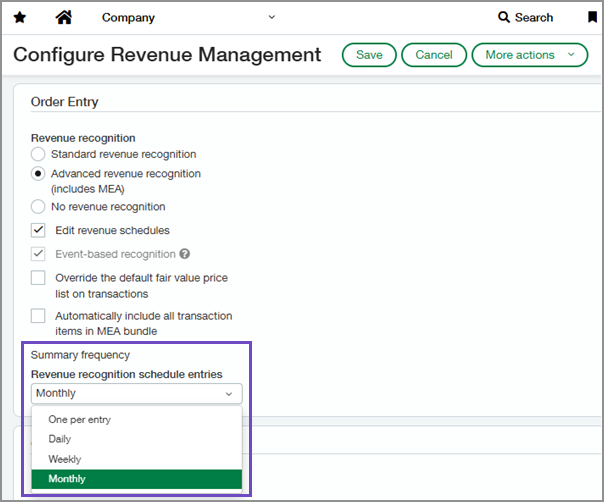
A new Summary frequency setting has been added to Revenue Management configuration. This setting controls how revenue recognition entries are grouped when posted to the General Ledger.
Available options include:
-
Daily
-
Weekly
-
Monthly
-
One per entry
When summarisation is enabled, revenue recognition entries are combined into a single journal entry when they share the same:
-
Document type
-
Currency
-
Location
-
General Ledger posting date
The One per entry option remains the default setting and preserves the previous behaviour, where each revenue recognition entry creates a separate journal entry.
Visibility within Order Entry configuration
To support transparency and control, Sage Intacct has added a new Rev rec summary frequency column to the Documents configuration tab within Configure Order Entry.
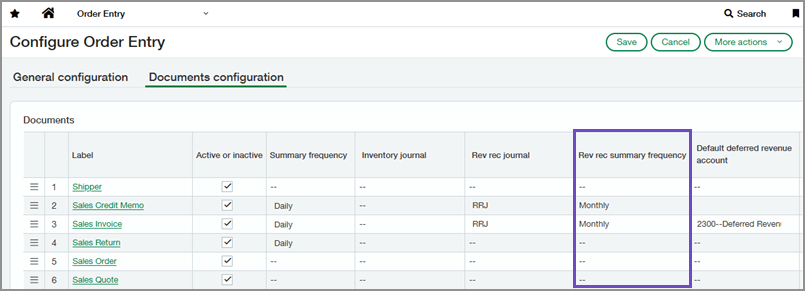
This column displays the summary frequency associated with each transaction definition that posts revenue and reflects the setting defined in Revenue Management. This allows finance teams to clearly see how revenue postings will be summarised for different document types without navigating away from Order Entry configuration.
New revenue summaries list
A new Revenue Summaries list is now available in Order Entry. This list provides visibility into summarised revenue postings and includes:
-
Posting dates
-
Summary amounts
-
Links to the corresponding General Ledger journal entries
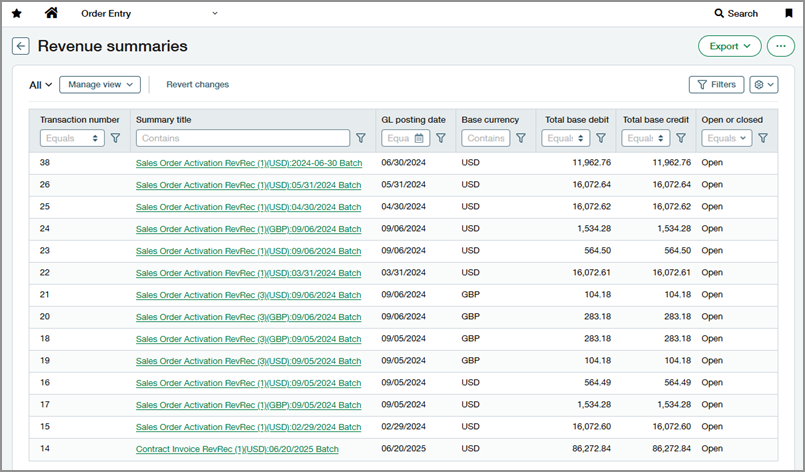
This gives finance teams a clear way to review how revenue has been grouped and posted, supporting reconciliation and audit review.
Expanded custom reporting options
Custom reporting has also been enhanced to improve traceability between revenue recognition schedules and General Ledger postings. The Revenue recognition schedule entry data source now includes relationships to:
-
Deferred revenue GL journal entry
-
Sales revenue GL journal entry
-
Exchange gain or loss GL journal entry
This allows organisations to report on which journal entries are associated with specific revenue recognition schedule entries, improving audit visibility and financial analysis.
Read more: "Summarize OE revenue recognition entries" >
Practical impact
In practice, this update helps organisations:
-
Streamline period-end close by reducing the number of GL entries to review
-
Improve performance by lowering transaction volume in the General Ledger
-
Scale revenue operations without introducing reconciliation complexity
This update changes how revenue recognition entries are posted to the General Ledger, not how or when revenue is recognised.
What to do next
If you want to review the full list of Sage Intacct 2025 R3 updates, the complete UK release notes are available here.
If you would like help understanding which of these changes are most relevant to your environment or how they can be applied in practice, get in touch with our expert team who are available to support you.


.png?width=100&name=HBP%20Gradient%20Bar%20(210mm).png)

 info@thehbpgroup.co.uk
 01482 423910


.png?width=2484&height=10&name=HBP%20Gradient%20Bar%20(210mm).png)