Cyber threats are not just increasing in volume, they are changing in nature.
Across April, we are seeing more examples of attacks that exploit trusted platforms, internal communication channels, and legitimate infrastructure, rather than relying solely on traditional phishing techniques.
This matters because many of the standard checks users rely on, such as verifying sender addresses or spotting poor formatting, are no longer enough.
Below are four current threats that reflect this shift, along with what your organisation should be doing differently as a result.
What To Do If You Receive a Suspicious Message
The safest response to any unexpected or unusual request remains consistent:
- Mark it as phishing or spam
- Do not click links or download attachments
- Do not reply or engage
- Do not forward internally for “second opinions”
- Independently verify the request using a trusted contact method
However, as the examples below show, verification is now the critical step, not just detection.
1. Microsoft Teams Impersonation (Exploiting Internal Messaging)
We are seeing cases where attackers use Microsoft Teams to impersonate internal users or trusted contacts.
Rather than sending phishing emails, they initiate conversations that appear legitimate and then attempt to persuade staff to carry out actions on their behalf.
In a recent real example observed within our organisation, attackers impersonated senior members of staff using recognisable names and roles.
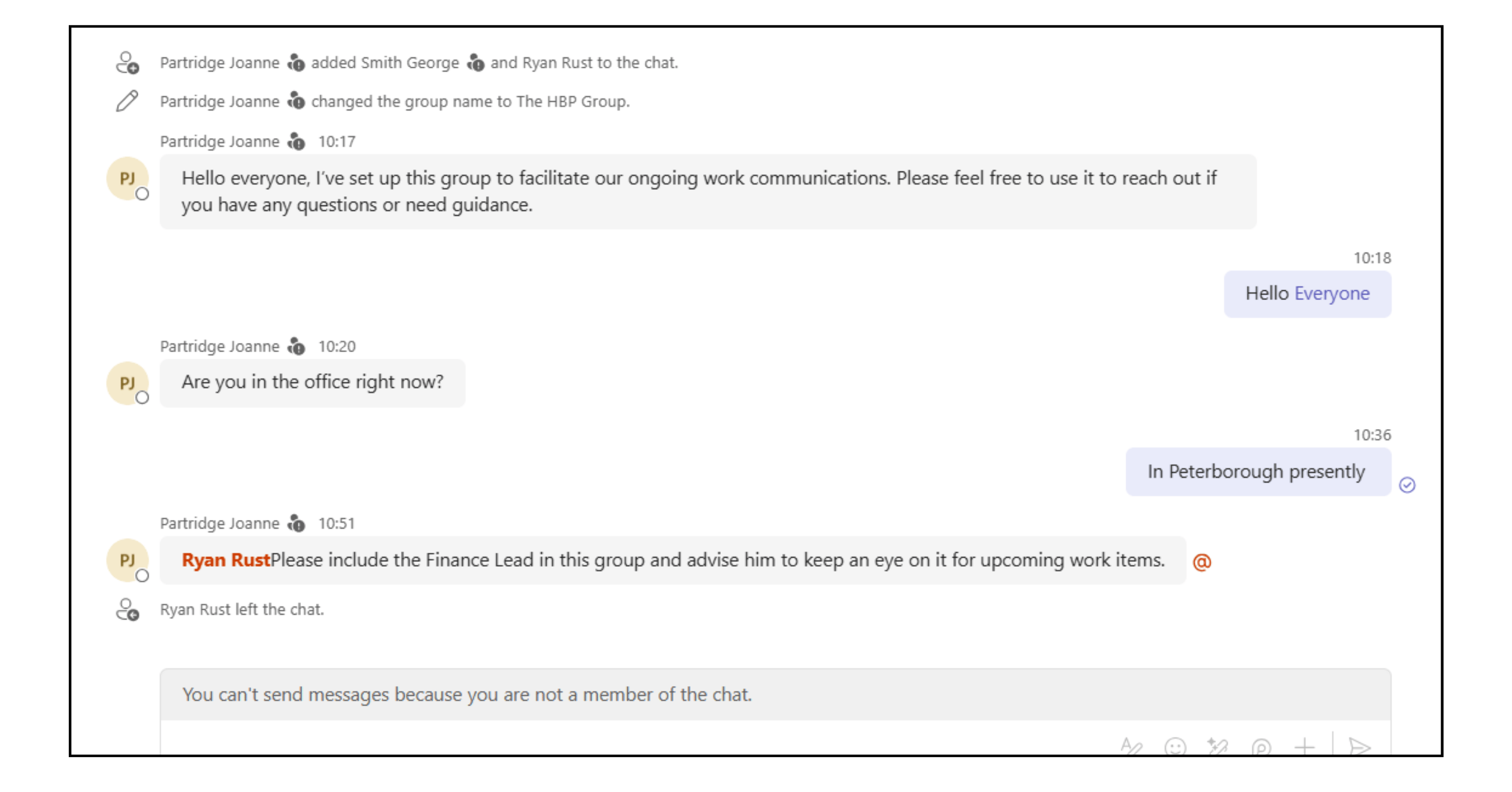
The attacker initiated a group chat and invited an employee into the conversation, likely aiming to build credibility before introducing a finance-related request, typically an urgent payment.
To better understand how this approach develops in practice, we cautiously engaged with the interaction. This allowed us to confirm the attacker’s intent and identify the techniques being used without exposing the organisation to risk.
At a glance, the interaction appeared convincing. The names were familiar, the context felt relevant, and the conversation took place within a trusted platform.
However, the first and most important warning sign appears immediately:
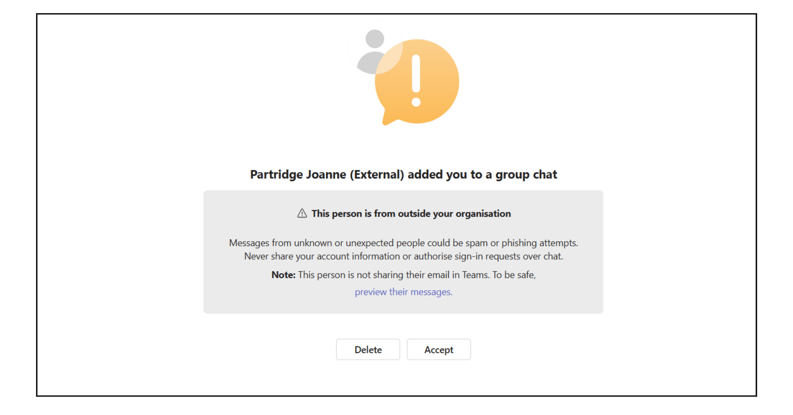
When you are added to a Teams chat by an external user, a notification is displayed indicating that the person is from outside your organisation.
This is one of the most important indicators. Even if the name matches a real colleague, manager, or director, this confirms the account is not internal and should not be trusted.
If the chat is accepted, an additional banner remains visible at the top of the conversation warning that external participants are present. This is another safeguard, but it is less prominent and can be overlooked in fast-moving situations.
What this attack is trying to achieve:
Once initial trust is established, the next step is typically to involve someone in finance and introduce urgency, often leading to requests such as:
- Processing an urgent payment
- Sharing sensitive financial information
- Approving access or credentials
What to watch for:
- Unexpected Teams messages, especially from senior staff
- Requests that create urgency or bypass normal processes
- Conversations that move quickly toward financial or security-related actions
Examples of higher-risk requests include password resets, MFA approvals, access changes, software installation, or payment-related actions.
Our recommendation:
- Treat unexpected Teams messages with caution, even if the sender appears to be someone you know
- Check for the “External” label near the sender’s name. This indicates the account is outside your organisation
- Independently verify any unusual, urgent, or security-related request using a trusted contact method
- Report suspicious Teams messages to your IT Service Desk immediately
- If you are unsure about any message, contact your IT Service Desk before taking action
2. Azure Alert Phishing (Abuse of Microsoft Infrastructure)
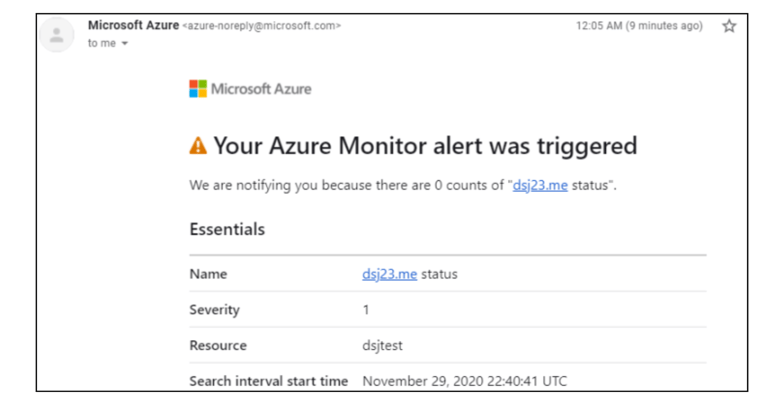
We are now seeing phishing campaigns that do not attempt to spoof Microsoft, they use Microsoft systems directly.
Attackers create Azure resources, configure alerts, and add target email addresses as recipients. When triggered, Microsoft sends a legitimate alert email on their behalf.
The message itself is authentic in terms of domain, formatting, and delivery.
Instead of including malicious links, these emails typically prompt the recipient to call a phone number, often framed as a billing issue or suspicious charge.
What this attack is trying to achieve:
Rather than relying on malicious links, the goal is to prompt users to take action outside of email, typically by calling a phone number where further social engineering can take place.
This often leads to attempts to:
-
Gaining access to accounts or systems
-
Extracting sensitive or financial information
-
Persuading users to install software or grant remote access
What to watch for:
-
Unexpected Azure or security alerts
-
Messages referencing charges or activity you do not recognise
-
Requests to call a number rather than click a link
-
Alerts sent to users who do not normally interact with Azure
Our recommendation:
-
Do not call phone numbers provided in unexpected alerts
-
Do not act on billing or security warnings without verifying them independently
- Access your account directly through official Microsoft portals instead of responding to the message
-
Report unexpected alerts to your IT Service Desk for validation
3. HMRC Tax Refund Scams (Seasonal Targeting)
As we approach the end of the tax year, HMRC-related scams become increasingly common.
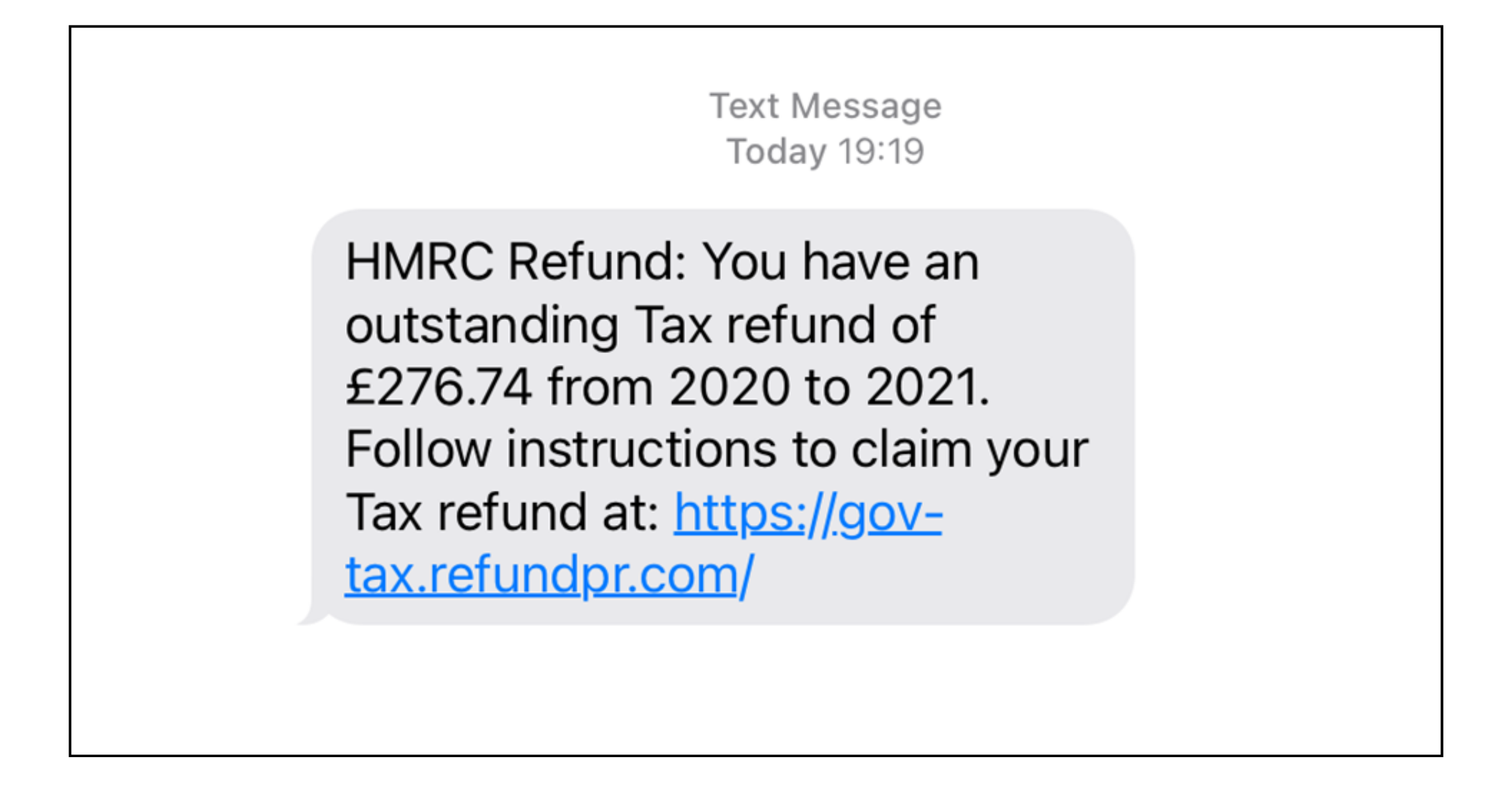
Attackers take advantage of this timing, sending messages that appear to come from HMRC claiming that you are owed a tax refund or need to take urgent action regarding your account.
These messages are typically delivered via SMS or email and include links to convincing websites designed to capture personal and financial information.
In many cases, the message creates urgency by suggesting that the refund is time-sensitive or that action is required immediately to avoid penalties.
What this attack is trying to achieve:
These messages aim to create urgency and authority, encouraging users to act quickly and share personal or financial information through fake websites.
This often leads to:
-
Submitting personal or financial details
-
Entering login credentials on fraudulent sites
-
Making payments or providing bank information
What to watch for:
-
Messages claiming you are owed a tax refund, such as:
-
Requests to click a link and enter personal or payment details
-
Unexpected communication about tax rebates or charges
-
Messages that create urgency around deadlines or penalties
Our recommendation:
-
Do not click links or respond to HMRC-related messages
-
Access your HMRC account directly instead, through official channels only
-
Treat any unexpected tax-related message as unverified until confirmed
4. Royal Mail Delivery Scam (Resurgence in SMS Phishing)
Royal Mail delivery scams are once again on the rise, with a noticeable increase in SMS messages impersonating the service.
These messages typically claim that a parcel could not be delivered and require the recipient to take action, such as updating delivery details or paying a small fee.
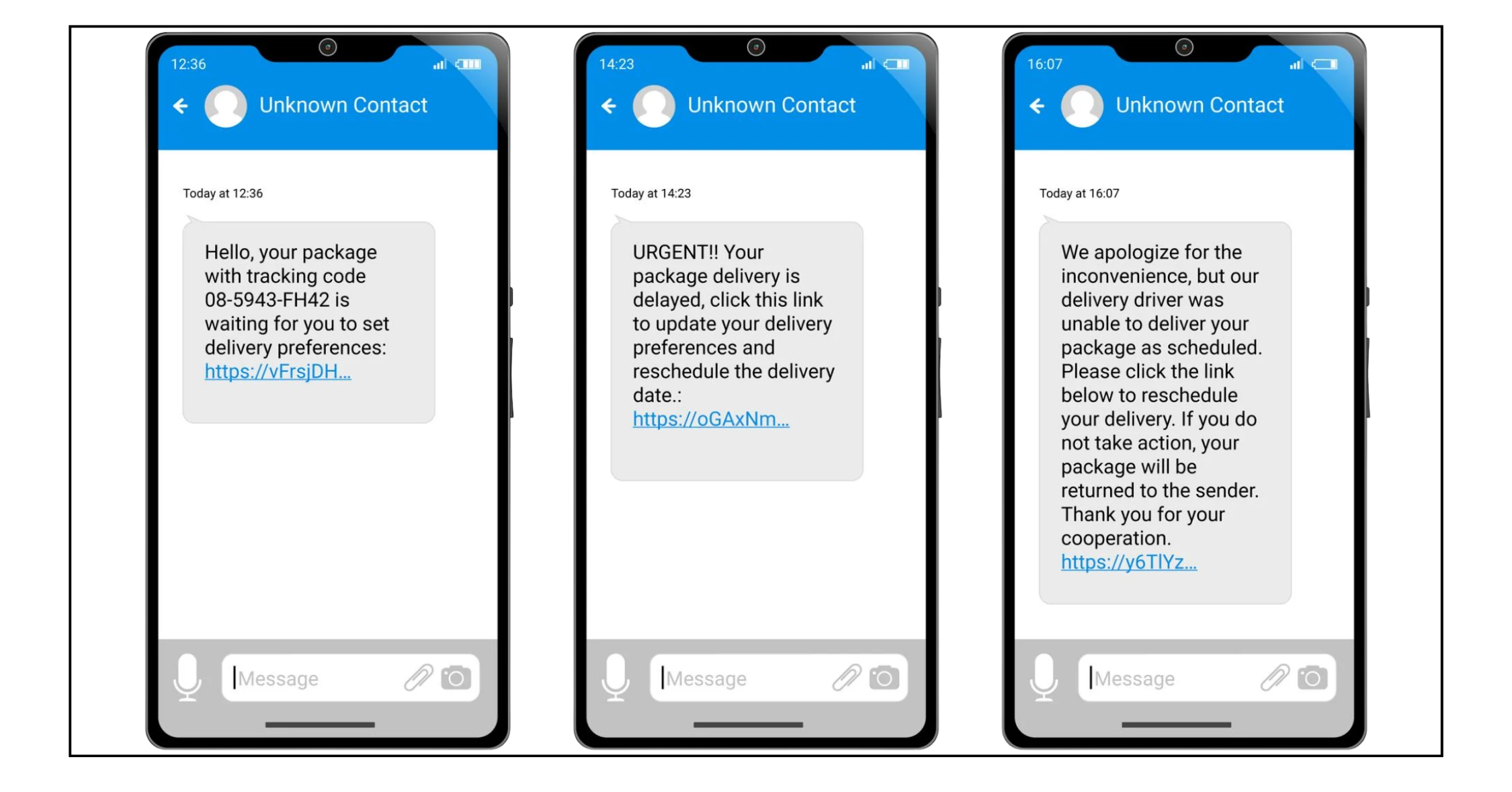
Below is an example of how these messages are currently being presented.
The format is designed to look credible at a glance, often including references to tracking, delivery issues, or small outstanding charges. The link provided directs to a website that closely mimics Royal Mail branding, with the aim of capturing personal and payment information.
What this attack is trying to achieve:
These messages are designed to take advantage of expected deliveries, prompting users to click links or make small payments that lead to compromised personal or financial information.
This often leads to:
Entering personal or payment details on fake websites
Making small payments that expose card information
Providing information that can be used in further attacks
What to watch for:
-
Messages claiming a missed or failed Royal Mail delivery, for example:
-
Requests to pay a small fee to release or redeliver a parcel
-
Links that lead to pages asking for personal or payment details
-
Messages from unknown or mobile numbers rather than official channels
Our recommendation:
-
Do not click links in delivery-related messages
-
Do not make payments through links sent via SMS
-
Check delivery status directly through the official Royal Mail website
-
Treat unexpected delivery messages as unverified, even if you are expecting a parcel
Why Traditional Checks Are No Longer Enough
Across these examples, the pattern is consistent:
These attacks don’t rely on breaking systems, they rely on people trusting what looks legitimate.
Whether it’s a Teams message, a Microsoft alert, or a well-timed SMS, the risk comes from acting too quickly without verifying.
The shift organisations need to make is simple:
- Don’t rely on how a message looks
- Don’t rely on where it comes from
- Focus on how it’s verified before any action is taken
Security now depends less on detection, and more on decision-making in the moment.
If a request involves urgency, access, or money, it should always be treated as unverified until proven otherwise.
If you want to discuss how your organisation is handling these types of threats, we can help.



.png?width=100&name=HBP%20Gradient%20Bar%20(210mm).png)

 info@thehbpgroup.co.uk
 01482 423910


.png?width=2484&height=10&name=HBP%20Gradient%20Bar%20(210mm).png)