AI Is Becoming Part of Everyday Business Central Workflows
Artificial intelligence has been part of Microsoft Dynamics 365 Business Central for some time through Copilot, but Microsoft's latest developments go much further. Rather than simply helping users search for information or complete individual tasks, Business Central now includes AI-powered agents designed to automate complete business processes.
Instead of acting like a chatbot, these agents work behind the scenes alongside your existing Business Central environment. They monitor inboxes, interpret documents, analyse requests, prepare transactions and only involve users when review, approval or additional information is needed.
The goal isn't to replace people. It's to remove repetitive administration so teams can spend less time entering data and more time making decisions.
Below are three AI capabilities worth understanding.
The Payables Agent Is Reducing Manual Invoice Processing
What's changed
The Payables Agent automates many of the manual steps involved in processing supplier invoices.
Once configured, the agent monitors a dedicated accounts payable mailbox for incoming supplier invoices. As emails arrive, it identifies PDF attachments, extracts key information such as supplier details, invoice numbers, dates and invoice values, then begins preparing the purchase invoice.
Rather than simply reading the document, the agent attempts to identify the correct supplier within Business Central. If it can't confidently match the vendor, it asks a user to review the suggestion or create a new supplier before continuing.
Once the supplier has been identified, the agent prepares a draft purchase invoice using the extracted invoice data alongside existing Business Central information, such as previous invoice history and vendor mappings, to suggest the most appropriate invoice details.
The draft is then presented to a user for review before being finalised, giving finance teams the opportunity to make changes, follow existing approval workflows and remain in complete control of the process.
Why it matters
Accounts payable is often one of the most repetitive and time-consuming finance functions.
By automating invoice capture and invoice preparation, businesses can:
- Reduce manual data entry
- Minimise processing errors
- Speed up invoice processing
- Improve consistency
- Allow finance teams to focus on reviewing exceptions rather than entering data
Rather than replacing your finance team, the Payables Agent removes much of the repetitive administration that slows invoice processing while ensuring people remain responsible for the final decision.
How the Payables Agent works
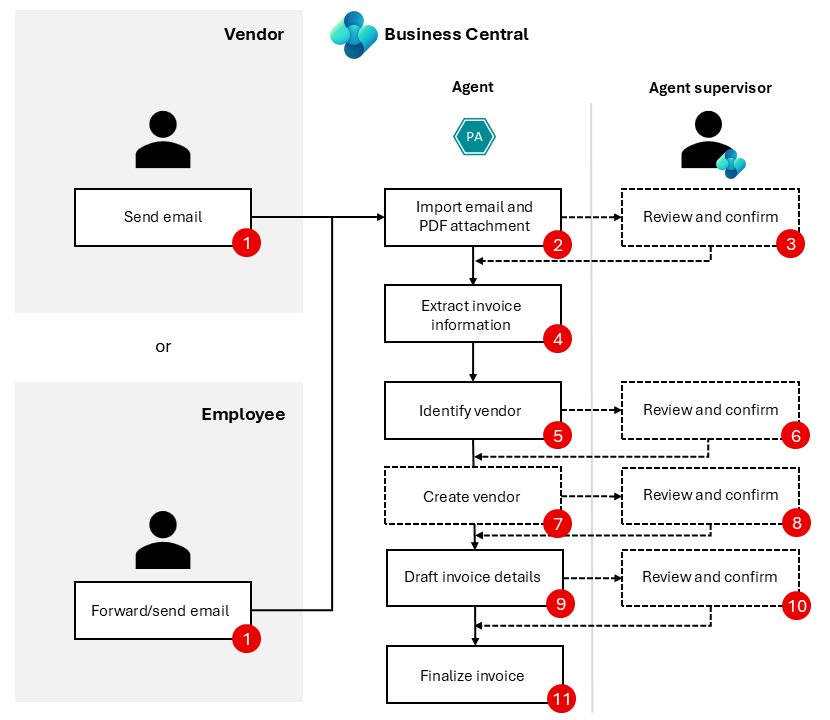
The diagram below shows a simplified view of how the Payables Agent automates supplier invoice processing.
Rather than simply capturing invoice data, the agent monitors a dedicated accounts payable mailbox, imports supplier invoices, extracts key information, identifies the correct supplier and prepares a purchase invoice draft. Throughout the process, users review key decisions before the invoice is finalised, helping reduce manual processing while maintaining complete oversight.
This allows finance teams to spend less time entering invoice data and more time reviewing exceptions and approving transactions.
Want to explore every step in more detail? Read the full Payables Agent documentation →
What you should do
If your finance team spends significant time manually processing supplier invoices, it's worth exploring whether the Payables Agent could streamline your existing workflow.
Microsoft continues to enhance the agent with every Business Central release, adding new functionality and making it an increasingly capable solution as part of its wider AI strategy.
The Sales Order Agent Helps Automate Customer Order Processing
What's changed
The Sales Order Agent is designed to automate many of the administrative tasks involved in handling customer enquiries and creating sales documents.
Like the Payables Agent, it monitors a dedicated mailbox. When a customer emails requesting products or a quotation, the agent analyses the email, reads attached documents where required and identifies the customer within Business Central.
It then searches your product catalogue, checks stock availability, prepares a sales quote and drafts an email response complete with a PDF quotation.
If important information is missing, the agent can continue the conversation by asking follow-up questions before producing the quote. It can also update quotations if customers request changes before converting an approved quote into a sales order.
Throughout the process, users remain in control by reviewing outgoing communications before they're sent to customers.
Why it matters
Creating quotations and processing customer orders can involve a surprising amount of repetitive administration.
By automating much of the process, businesses can:
- Respond to customer enquiries more quickly
- Reduce manual administration
- Improve the consistency of quotations
- Check product availability automatically
- Reduce time spent preparing sales documents
- Free sales teams to spend more time building customer relationships
Rather than simply speeding up order entry, the Sales Order Agent helps automate much of the communication and document preparation that sits around the sales process.
How the Sales Order Agent works
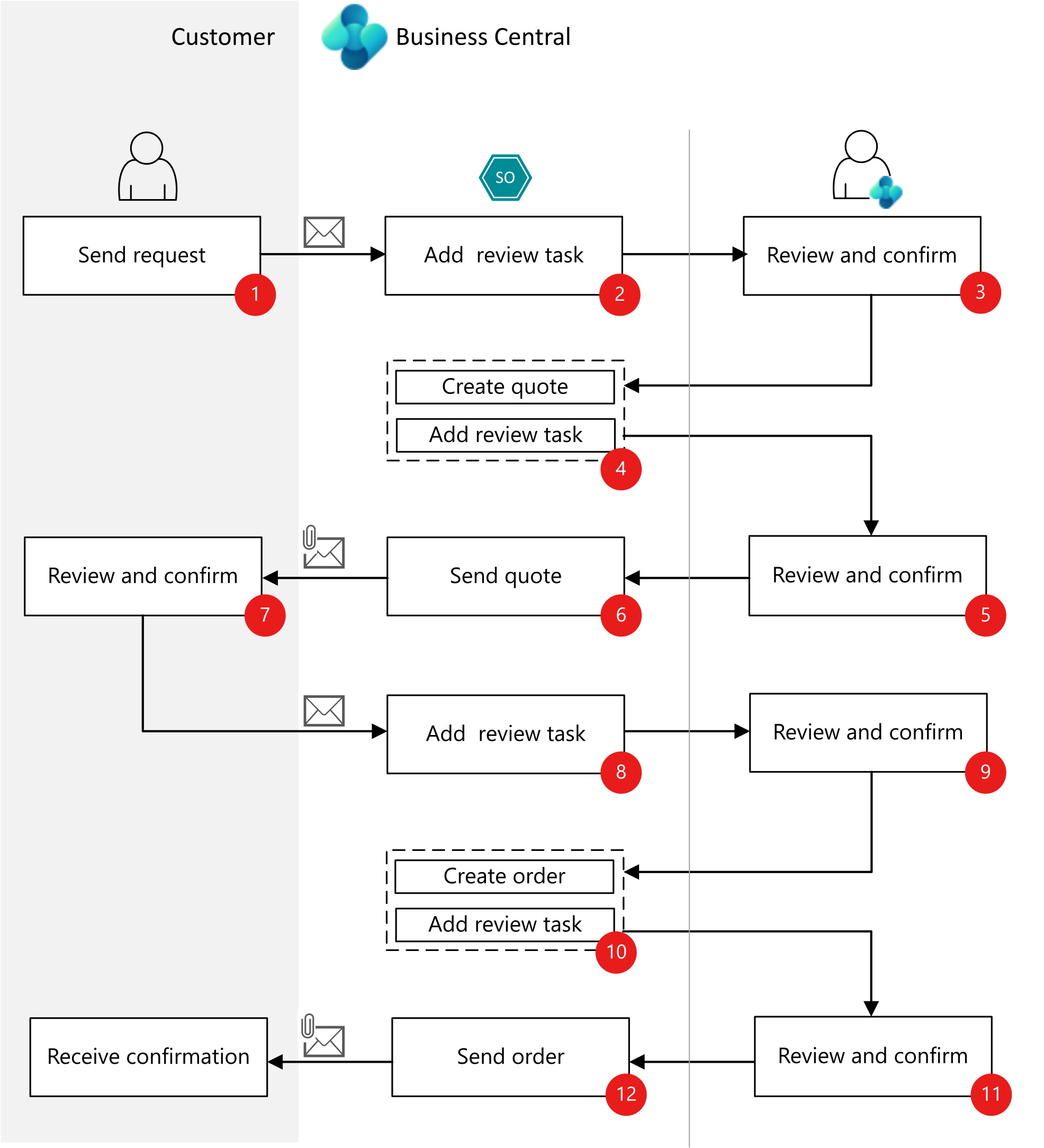
The diagram below shows a simplified view of how the Sales Order Agent automates the journey from a customer's initial enquiry through to a confirmed sales order.
The agent monitors a dedicated sales mailbox for customer enquiries, analyses requests, identifies the customer, checks product availability and prepares a sales quote. If any information is missing, it can continue the conversation with the customer before producing a final quote.
Once reviewed internally, the quote is sent to the customer. When the customer confirms they're happy to proceed, the agent converts the quote into a sales order before preparing the confirmation for final approval and sending it back to the customer.
Although every business process is slightly different, this provides a good overview of how AI works alongside your team to reduce manual administration while keeping people in control of customer communications.
Want to explore every step in more detail? Read the full Sales Order Agent documentation →
What you should do
If your business processes a high volume of customer enquiries or sales quotations, it's worth understanding how the Sales Order Agent could reduce manual administration while maintaining complete oversight of customer communications.
The Expense Agent Simplifies Employee Expense Claims
What's changed
The newest addition to Microsoft's AI capabilities is the Expense Agent.
Employees can capture receipts using their mobile device before submitting expenses directly into Business Central for approval. Rather than manually entering expense information, the agent extracts key details from receipts and prepares expense claims ready for review.
While the Expense Agent is still earlier in its development than Microsoft's Sales and Payables Agents, it already provides a simple option for organisations with straightforward expense processes.
Why it matters
Expense claims often rely on paper receipts, spreadsheets and manual administration.
Introducing AI into the process can help businesses:
- Simplify expense submissions
- Reduce manual administration
- Improve consistency
- Speed up approval processes
- Make it easier for employees to submit expenses accurately
For organisations with straightforward expense requirements, the native Expense Agent provides another example of Microsoft's continued investment in AI across Business Central.
What you should do
If you're reviewing how employee expenses are managed, it's worth understanding what the Expense Agent can already do today and how Microsoft is continuing to develop the functionality through future Business Central releases.
AI Is Changing The Way Businesses Use Business Central
Microsoft's investment in AI isn't about adding standalone features. It's about changing how everyday work gets done.
Whether it's processing supplier invoices, responding to customer enquiries or simplifying expense claims, these agents are designed to remove repetitive administration while keeping people responsible for the decisions that matter.
As Microsoft continues releasing two major Business Central updates each year, these AI capabilities will only become more capable, making now a good time to understand how they could fit into your existing business processes.
Want To See These AI Features In Action?
Every organisation uses Business Central differently, so the best way to understand whether these AI capabilities could benefit your business is to see them in action.
If you'd like to explore the Payables Agent, Sales Order Agent or Expense Agent in more detail, our team can provide a personalised demonstration and discuss how they could fit into your existing Business Central environment.
Get in touch to arrange a demo and discover how AI could help you get even more from Microsoft Dynamics 365 Business Central.



.png?width=100&name=HBP%20Gradient%20Bar%20(210mm).png)

 info@thehbpgroup.co.uk
 01482 423910


.png?width=2484&height=10&name=HBP%20Gradient%20Bar%20(210mm).png)