Pegasus Opera 3 is packed with useful functionality, but when you use the same system every day it is easy to fall into familiar routines and overlook some of the features that could make life easier.
Sometimes the biggest productivity gains do not come from introducing a completely new system or process.
They come from making better use of the tools you already have.
So, whether you work in finance, payroll, purchasing or another area of the business, here are 12 practical ways to get more from Pegasus Opera 3.
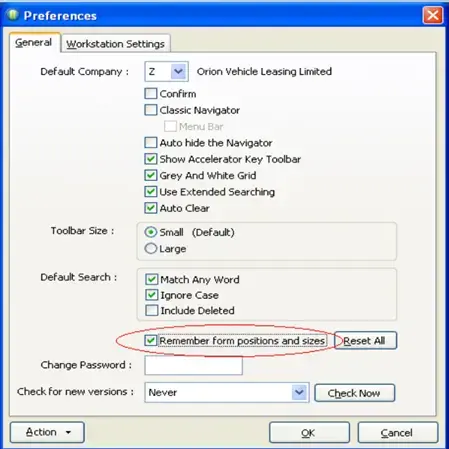
1. Save your preferred form positions and sizes
If you regularly resize or reposition Opera 3 windows to suit the way you work, you do not have to set them up again every time.
Opera 3 can remember your preferred form positions and sizes.
Simply go to:
System > Preferences
and select the option to remember form positions and sizes.
It is a small change, but for users who spend most of the day moving between the same screens, it can make Opera 3 feel much more tailored to the way they work.
2. Copy grid data straight into Excel
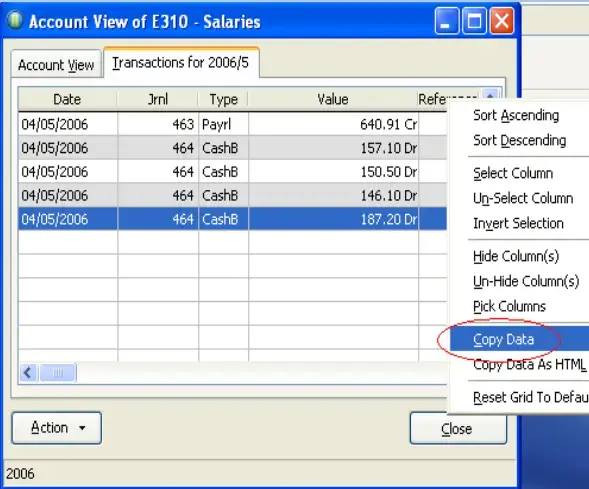
There are times when you simply need to get information out of Opera 3 and work with it in Excel.
For grid-based forms, you can copy the data directly.
Open the relevant Opera grid, right-click on a column heading and select Copy Data.
You can then paste the information into Excel.
This can be particularly useful for quick ad-hoc analysis where you do not need to build or run a formal report.
Opera 3 also provides dedicated Excel reporting and integration options across the product, including report exports and Pegasus XRL.
3. Sort and rearrange columns to suit the job
Opera 3 grids can also be adjusted to make the information you need easier to find.
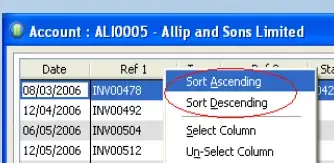
Right-clicking a column heading allows you to sort information in ascending or descending order.
Depending on the screen, you can also rearrange the layout to make the most useful information easier to see.
That can be particularly helpful when reviewing long customer, supplier or transaction lists.
Rather than working through records in the order Opera presents them, take a moment to organise the view around the question you are trying to answer.
[INSERT SCREENSHOT: Original Tip 3 – Column sorting / ascending and descending options]
Pegasus Opera 3 Tip 4: Linking Pictures and/or Documents to Records
- In your Processing form, click Action – OLE
- Add a new link by clicking ‘New’
- Browse and add your document and/or Picture
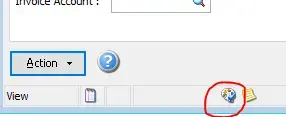
Note – an icon appears in the status of the record processing form to show that an object exists
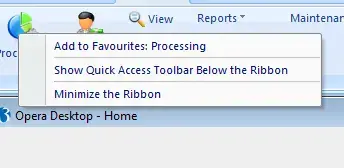
4. Create favourites for the screens you use most
If there are certain Opera 3 areas you use every day, adding them to Favourites can save you repeatedly navigating through the full menu structure.
To create a Favourite:
- Find the menu item you want to save.
- Right-click it.
- Select Add to Favourites.
- Choose the relevant Favourite group.
You can create groups to organise shortcuts around your own role or responsibilities.
A finance user, for example, might group together their most commonly used Sales Ledger, Purchase Ledger and Nominal Ledger screens.
The aim is simple: make the things you use most often quicker to reach.
5. Link documents and files to relevant records
Opera 3 allows users to associate supporting files with records.
This can be useful where you want to keep additional information close to the transaction or account it relates to.
Within the relevant processing form, the OLE functionality can be used to create a link to an external document or image.
Once linked, an indicator appears against the record to show that an object exists.
That can help reduce the time spent searching through shared folders or paper files for supporting information.
6. Use disputed invoice functionality to improve credit control
Not every unpaid invoice is simply overdue.
Sometimes a customer has queried the invoice, and treating that balance in exactly the same way as every other debt can make credit control harder.
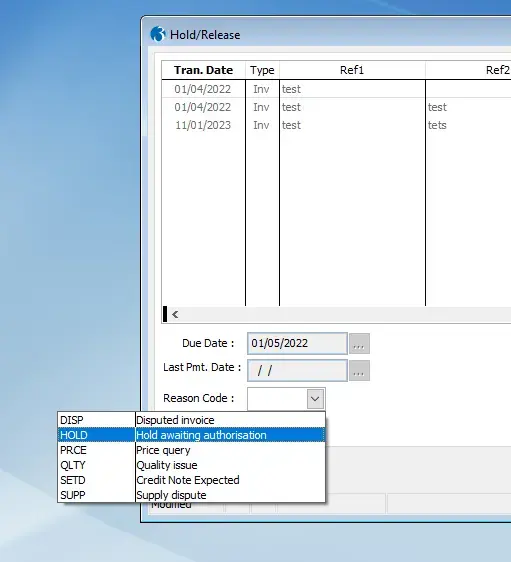
Opera 3 allows you to mark invoices as disputed and record a reason.
This can help teams distinguish between:
“The customer hasn’t paid”
and:
“The customer isn’t paying because there is an issue that needs resolving.”
Keeping these reasons up to date gives finance teams a much clearer picture of which debts need chasing and which require investigation first.
7. Make use of advanced postings
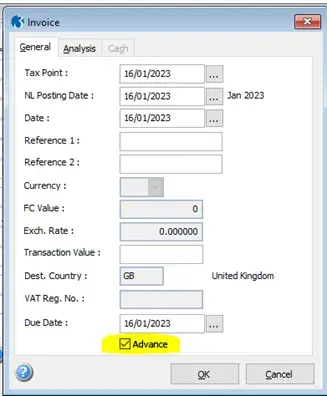
Advanced postings can be helpful when a transaction belongs to a future accounting period.
When enabled, Opera 3 can allow a new transaction to be allocated to a future period so it does not affect the current period balance prematurely.
This can be particularly useful around month-end or year-end where transactions are being processed ahead of the period they actually relate to.
As with any financial control, it is important that users understand how the feature works and that period-end processes are followed correctly.
If your finance team regularly has to hold transactions outside the system until the next period opens, this is one area worth reviewing.
8. Schedule routine tasks to run automatically
One of the most useful ways to save time in Opera 3 is to avoid manually starting processes that could run to a schedule.
Pegasus Scheduler allows organisations to schedule selected Opera 3 tasks, including processes that are better run outside normal working hours.
This can make sense for repetitive or resource-intensive jobs.
Rather than somebody having to remember to run the same process every day, week or month, it can potentially happen at a predetermined time.
The result is not just less administration, but more consistency.
9. Make better use of Opera 3 reporting and Excel output
If you regularly print a report only to manually type figures into another spreadsheet, it is worth checking whether there is a better output option available.
Opera 3 supports Excel output across a range of reports, and Pegasus has continued extending these capabilities.
The exact options available will depend on your Opera 3 version and configuration, but the wider point is worth remembering:
Do not assume that manually rebuilding a report in Excel is your only option.
If a report is used regularly, there may already be a better way of producing or distributing it.
10. Use XRL for more flexible Excel reporting
For businesses that spend a lot of time analysing Opera 3 information in Excel, Pegasus XRL is another feature worth exploring.
XRL links Opera data with Microsoft Excel and is designed to provide reporting and analysis without repeatedly copying, pasting or rekeying figures.
This can be particularly useful where finance teams already have established Excel-based management packs or analysis processes but want to reduce the manual work involved in populating them.
Rather than treating Excel and Opera 3 as completely separate environments, XRL can provide a more joined-up approach.
11. Reduce paper and manual filing with Document Management
If your Opera 3 process still relies heavily on paper invoices, printed reports or documents stored across shared folders, Document Management may be worth another look.
Pegasus Document Management is designed to securely capture and retrieve documents alongside Opera 3.
That can include electronic files such as:
- PDFs
- Word documents
- Excel spreadsheets
- scanned documents
For finance teams, the benefit is often less about “going paperless” as a headline goal and more about making supporting information easier to find.
If somebody needs to investigate a transaction, the relevant documentation should ideally be available without searching through an inbox, filing cabinet and shared drive.
12. Keep your Opera 3 environment up to date
One of the simplest ways to miss useful functionality is to remain on an older version of Opera 3 for longer than necessary.
Pegasus continues to release maintenance and functional updates.
Keeping the software current is therefore about more than receiving technical fixes.
It can also mean gaining access to usability improvements and newer functionality that could make everyday processes easier.
If you are not sure which version of Opera 3 you are currently using, or whether there are newer features available to you, it is worth checking.
Small improvements can add up
Not every improvement to Opera 3 requires a major project.
Sometimes it is simply a case of finding a quicker way to reach a screen, making better use of reporting tools or automating something that somebody has been starting manually for years.
Individually, those changes may only save a few minutes.
Across several people and repeated tasks, they can add up to a significant amount of time.
It is also worth periodically reviewing the way your organisation uses Opera 3.
Processes change.
Teams change.
Requirements change.
The way the system was configured several years ago may not necessarily be the most efficient way to use it today.
Are you getting everything you can from Opera 3?
If your team is spending too much time on manual reporting, repetitive processes or workarounds around Opera 3, it may be worth reviewing how the system is being used.
At The HBP Group, we can help you understand the functionality already available within your Opera 3 environment, identify areas where processes could be improved and make sure you are getting as much value as possible from the software you already have.
Speak to The HBP Group about getting more from Pegasus Opera 3.

.png)

.png?width=100&name=HBP%20Gradient%20Bar%20(210mm).png)

 info@thehbpgroup.co.uk
 01482 423910


.png?width=2484&height=10&name=HBP%20Gradient%20Bar%20(210mm).png)